SubPair / Guides
How to learn vocabulary from TV shows
Updated
Short answer: don’t try to remember every new word. Save a few useful words and phrases per episode together with the line they came from. Then test yourself on them at growing intervals: a day later, a few days later, a week later. Recall the word before you look at the answer. This is called spaced repetition, and it turns words you met once into words you keep.
What is SubPair?
SubPair is a Chrome extension that shows two subtitle lines at once on Netflix, YouTube and Disney+: the original and a translation in your language. Click any word for its meaning, save words and phrases, and review them later. It is currently free for everyone, with unlimited auto-translation and every Pro feature; a paid Pro plan may come later.
Why words from shows slip away
While you watch, a new word makes sense: the scene explains it. A week later it is gone, because you met it once and never needed it again. Memory works by retrieval: each time you have to pull a word back up, it gets easier to find the next time. Reviews spread out over days work better than the same amount of review in one sitting (Cepeda and colleagues, 2006), and trying to recall an answer helps more than reading it again (Roediger and Karpicke, 2006).
The method in five parts
1. Save less than you think
Save a word when you have heard it more than once, when you would like to use it yourself, or when not knowing it cost you the scene. Skip names, rare jargon and words you can guess from context. A short list you review beats a long one you never open.
2. Keep the whole line
A word on its own is easy to forget; a word in the sentence a character said is tied to a voice, a scene and a situation. The line also shows how the word is used: which preposition follows it, whether it is polite or rude, formal or casual. Save phrases as phrases: “look forward to” means more than “look”.
3. Test yourself before you look
Reading a list of words and meanings feels productive but teaches little. Cover the word, read the line, and try to fill the gap. Getting it wrong first and then seeing the answer still helps you remember it.
4. Space the reviews out
Review a new word the next day. If you remember it, wait longer before the next review: three days, then a week, two weeks, a month. If you forget it, start again with short gaps. Easy words quickly stop taking your time; hard ones come back until they stick.
5. Meet the word again in the wild
Keep watching the same series: its characters reuse the same vocabulary, and recognising a word you saved, in a new scene, is the best review of all.
How SubPair does this: Words and Review
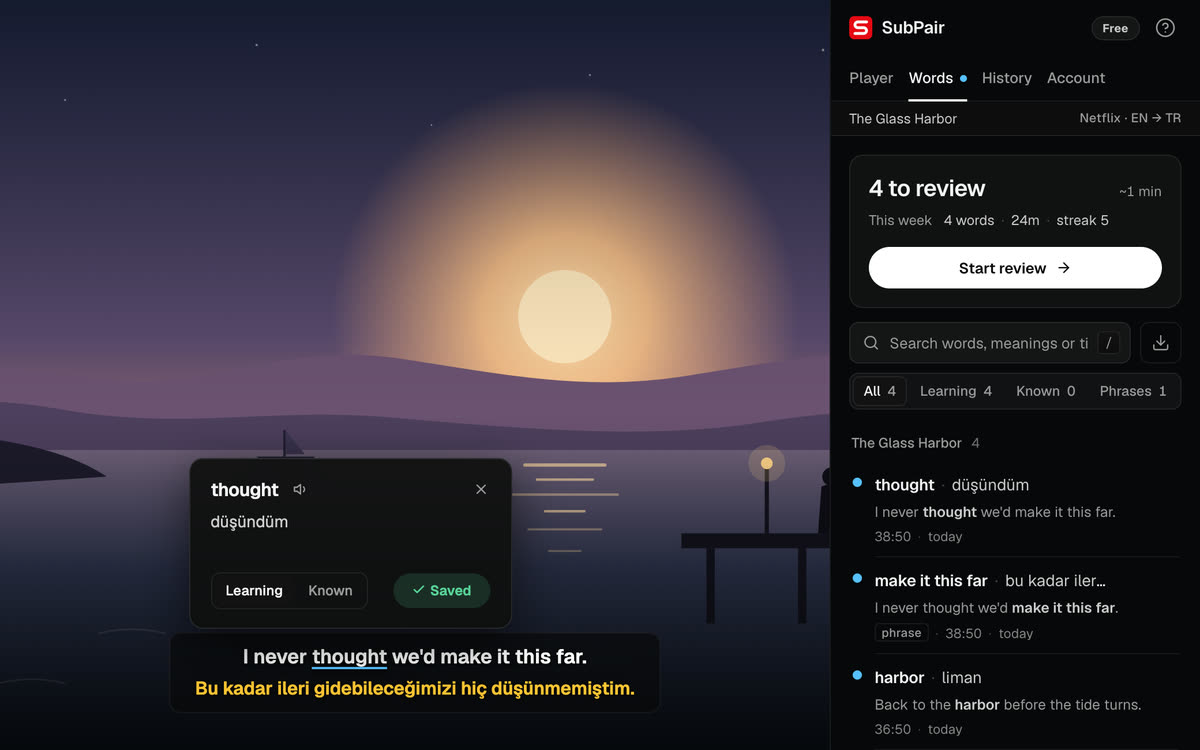
- Click any word in the subtitle for its meaning and save it. Drag across several words to save a phrase.
- Each saved entry keeps the line it came from, its translation, the title and, on Netflix and YouTube, the moment in the video.
- Words you are learning are marked when they appear in subtitles again.
- The Words tab in the side panel lists everything you saved and shows how many words are due for review today.
Review in five steps
- Open the SubPair side panel and go to the Words tab. It shows how many words are due today.
- Click Start review.
- Read the line with the missing word and try to recall it before you look.
- Press Show (or Space) to see the answer, its meaning and the translated line.
- Rate how well you knew it: Again, Good or Easy (keys 1, 2, 3). The next review date is shown under each button.
What each answer does
- Again
- The word comes back at the end of the same session and starts over from the shortest gap.
- Good
- The word moves one step further: 1 day, then 3, 7, 14, 30 and 60 days.
- Easy
- The word skips a step, so it comes back later than with Good.
- Learned
- After the 60-day step a word is marked Known and leaves the review. You can set it back to Learning at any time.
On Netflix and YouTube, Open scene takes you back to the moment the word came from, so you can hear it again.
A daily routine
- Before
- A few minutes of review in the side panel.
- During
- Watch, and save only the words you would want to use.
- After
- Look over the words you saved today and delete the ones you don’t need.
Getting the words on screen first: learn English with Netflix, learn any language with Netflix or learn a language with YouTube.
Questions about learning vocabulary from shows
A way of reviewing in which you see a word again just before you would forget it. Each time you remember it, the gap before the next review gets longer; each time you forget, the gap starts small again. It takes less time than reviewing everything every day, and you remember more.
There is no right number. Save as many as you will actually review. For most people that is a handful of useful words and phrases per episode, not every word they didn't know.
Both. Save a phrase when the words belong together, like phrasal verbs, idioms or set expressions, because their meaning is in the combination. Either way, keep the line it came from.
A few minutes a day is enough for most lists. SubPair shows an estimate before you start, and adds at most 10 new words to a session, so a busy week of saving doesn't turn into one long session.
Yes. Write the whole line in a notebook or a flashcard app, hide the word, and review it after 1, 3, 7, 14 and 30 days, starting again when you forget. An extension only saves you the copying.
Yes. You can export them as CSV at any time, and as Anki cards with scene context. Sign in to keep the same list on every Chrome you use.
Start your list on the next episode
Saving and review are free right now, with no account needed.