SubPair / Guides
How to learn English with Netflix
Updated
Short answer: watch English-language shows with the original English audio. Put English subtitles on top and your own language underneath, look up and save the words that stop you, and review them for a few minutes before the next episode. As your English improves, hide your own language and keep only the English line. On the Netflix website in desktop Chrome, a dual-subtitle extension such as SubPair shows both lines at once.
Free right now, no account needed. Runs in desktop Chrome.
What is SubPair?
SubPair is a Chrome extension that shows two subtitle lines at once on Netflix, YouTube and Disney+: the original and a translation in your language. Click any word for its meaning, save words and phrases, and review them later. It is currently free for everyone, with unlimited auto-translation and every Pro feature; a paid Pro plan may come later.
Why it works, and what it won’t do
Watching with subtitles in the language you are learning is one of the better-studied ways to pick up vocabulary outside a classroom. Research reviews of many studies have found that captioned and subtitled video helps both listening and vocabulary (Reynolds and colleagues, 2022).
Shows also use a fairly small set of everyday words again and again. In a study of 88 TV programmes, the 3,000 most frequent word families, plus names and exclamations such as “oh”, covered about 95% of the words spoken (Webb and Rodgers, 2009). So the same series keeps showing you the words that matter most.
What Netflix won’t do is make you speak or write. Treat it as your listening and vocabulary practice next to a course, a teacher or conversation practice.
Pick a show for your level
- Beginner: animated series, family comedies and reality shows about cooking, homes or travel. The speech is clear, episodes are short, and what you see on screen explains a lot of what you hear.
- Intermediate: sitcoms and dramas about work, school or family life, and documentary series with a narrator. Everyday vocabulary, a little faster.
- Advanced: legal, medical and political dramas, period dramas and fast comedy built on wordplay. Lots of specialist words, strong accents and jokes that depend on the language.
A show you have already seen dubbed in your language is a good start: you know the story, so your attention goes to the words. Long series help too, because the same characters keep using the same vocabulary. At first, stay with one accent, American or British for example, before you mix them.
Netflix’s catalogue and the subtitle languages of each title differ by country. On the Netflix website, the Browse by Languages page lists titles by original language, audio or subtitle language.
Use subtitles in stages
- Stage 1
- English on top, your language underneath. Read the English line first and glance down only when you need to.
- Stage 2
- Blur your language (Alt+B) and reveal it only when you are stuck.
- Stage 3
- English subtitles only. Look up single words instead of reading a translation.
- Stage 4
- No subtitles for a scene you have already watched. Then turn them on and check what you missed.
You don’t move up for good: a hard new series can send you back to Stage 1 for a few episodes, and that is normal.
Know what English subtitles leave out
- Subtitles are often shorter than the speech. Fillers and repeated words are dropped so the line can be read in time, so what you read and what you hear will sometimes differ.
- An English [CC] track adds sound descriptions and speaker names in brackets, such as [laughs]. Useful for following, but not part of the dialogue.
- For a show made in another language, English audio is a dub and the English subtitles are usually a separate translation, so they often don’t match. To learn English, choose titles originally made in English.
Set up English and your language in five steps
- Install SubPair in desktop Google Chrome (Windows, macOS, Linux or ChromeOS).
- Open an English-language title on the Netflix website, keep the original English audio and press play.
- Click the SubPair icon in the Chrome toolbar to open the side panel.
- Choose English for the top line and your own language for the second line.
- Watch. When a word stops you, click it for its meaning and save it; review your saved words before the next episode.
More detail, including where the second line comes from: dual subtitles on Netflix, step by step.
Turn an episode into a lesson
- Auto-pause (Alt+P) stops the video after each line, so you can read both lines before moving on.
- S replays the current line; A and D go to the previous or next one.
- Sentence loop (Alt+L) repeats one line. Say it out loud along with the actor — this is called shadowing, and it trains pronunciation and rhythm.
- Click a word for its meaning. Drag across several words to save a phrasal verb or an idiom as one phrase, such as “figure it out” or “no big deal”.
- Netflix’s own speed menu can slow a fast scene down.
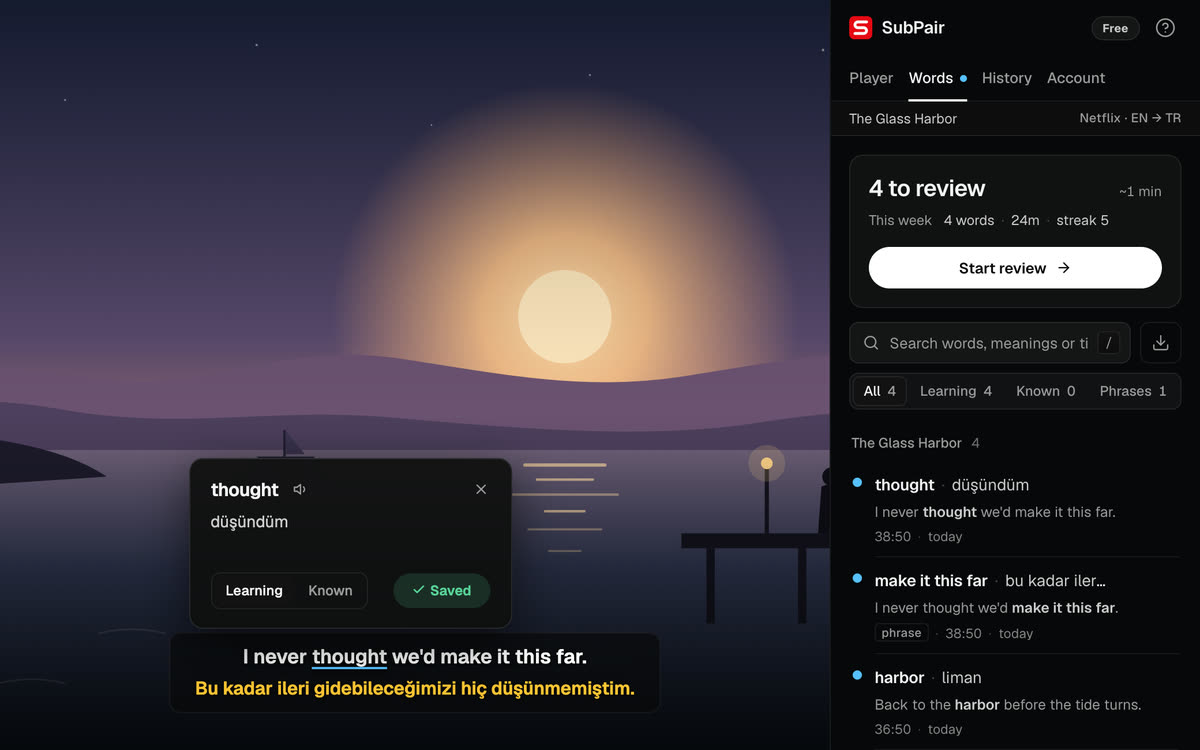
Keep the words you meet
A word you meet once in an episode is usually gone by next week. Save a handful of useful words and phrases with the line they came from, and review them a day later, a few days later, then a week later. How to learn vocabulary from TV shows explains this save-and-review method step by step.
Common mistakes
- Watching a show dubbed into English: the lips, the subtitles and the audio don’t match.
- Reading only your own language: your eyes go to the easy line. Read the English line first.
- Saving every unknown word: a long list you never review teaches less than a short one you do.
- Starting with the hardest show: if you need the translation for almost every line, choose something easier for now.
Questions about learning English with Netflix
Start with both: English on top so you connect what you hear with how it is written, and your language underneath so you don't get lost. When you follow most of the English line, blur your language and check it only when you are stuck. Watching with only your own language's subtitles mostly trains reading in your own language.
Watching gives you a lot of listening and everyday vocabulary, but it won't teach you to speak or write on its own. Combine it with a course, a teacher or conversation practice, and watch actively: look words up, save them and review them.
You can start at a beginner level if your own language is on screen as a second line. Shows with clear, everyday dialogue are easiest. Following without any help usually needs a vocabulary of a few thousand common words, so treat full English-only viewing as a goal, not a starting point.
It is a closed-caption track: the English dialogue plus descriptions of sounds and speaker names, such as [door slams]. It helps you follow who is speaking. The descriptions in brackets are not part of the dialogue.
Two subtitle lines need a browser extension, so this part works only on the Netflix website in desktop Chrome. The rest of the method, choosing shows, watching actively and reviewing words, works anywhere.
Right now SubPair is free for everyone: unlimited auto-translation and every Pro feature, including per-line appearance and Anki export, with no account needed to start. A paid Pro plan may come later.
Try it on your next episode
The method works for other languages too: see Korean, Japanese and Spanish and learning with YouTube.