SubPair / Guides
How to learn a language with Netflix
Shows in the language you are learning help most when you watch actively: you notice words, keep them and meet them again. This guide walks through a simple routine built on two subtitle lines, word look-ups and short reviews. You need your own Netflix subscription and desktop Chrome.
What is SubPair?
SubPair is a Chrome extension that shows two subtitle lines at once on Netflix, YouTube and Disney+: the original and a translation in your language. Click any word for its meaning, save words and phrases, and review them later. The free plan includes unlimited dual subtitles from each platform’s own subtitle tracks; Pro costs $4.99 a month or $39 a year.
1. Choose a show you will actually finish
Pick a series in the language you are learning with dialogue you can mostly follow. Comedies and dramas about everyday life tend to use common words; fantasy, legal and medical dramas are heavier going. Long series help, because the same characters and vocabulary keep coming back. Rewatching something you already know in your own language also works — you already know the plot, so your attention goes to the words.
2. Put two subtitle lines on screen
Put the language you are learning on top and your own language underneath. The top line connects what you hear to how it is written; the bottom line keeps you from getting lost. With SubPair, both lines come from Netflix’s own subtitle tracks whenever your language is available, so they match what is said line by line.
Setting it up takes a minute: dual subtitles on Netflix, step by step.
3. Watch in short, active sessions
One focused episode is usually worth more than an evening of background viewing. A few controls make the difference:
- Auto-pause (Alt+P) stops the video after each line, so you can read both lines before moving on.
- S replays the current line; A and D go to the previous or next one.
- Sentence loop (Alt+L) repeats one line. Say it out loud along with the actor — this is called shadowing, and it trains pronunciation and rhythm.
4. Click words, save phrases
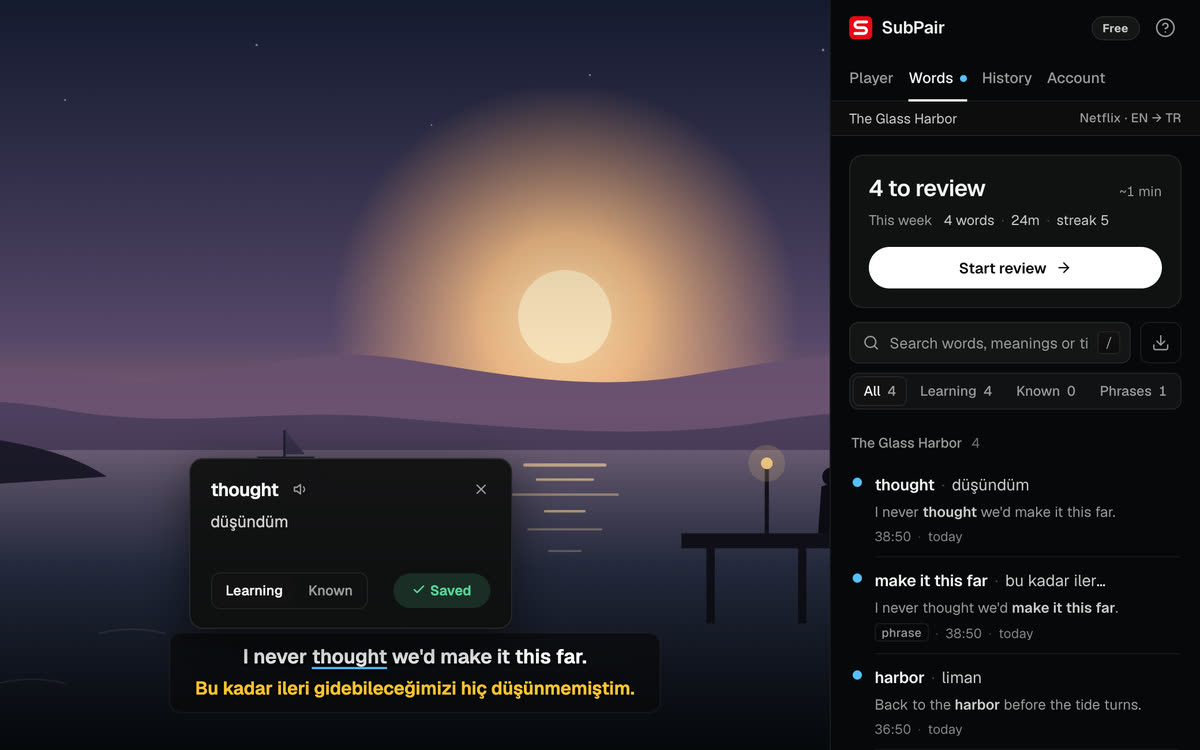
When a word stops you, click it to see its meaning without leaving the scene. Drag across several words to keep a whole expression — idioms and phrasal verbs are often where the meaning is. Each saved entry keeps the subtitle line it came from, and that context is what makes it easier to remember later.
Be selective: save the words you would want to use yourself, not every word you don’t know.
5. Review for a few minutes before the next episode
Saved words come back in the review in SubPair’s side panel, shown in the subtitle line they came from. You rate each one — Again, Good or Easy — and the hard ones return sooner than the easy ones. This is spaced repetition: reviewing just before you would forget.
Sign in if you want your list on every Chrome you use. You can also export it as CSV at any time.
6. Lean less on your own language over time
As the top line gets easier, blur the translation (Alt+B) and reveal it only when you are stuck. Later, try an episode you have already watched with the original line only.
A routine that fits in an evening
- Before
- A few minutes of review in the side panel.
- During
- One episode with both lines. Auto-pause on for difficult scenes; click and save as you go.
- After
- Look over the words you saved today and delete the ones you don’t need.
- Once a week
- Rewatch one scene with the translation blurred and see how much you follow.
Questions about learning with Netflix
Netflix won't teach you grammar step by step, but it gives you hours of real listening and everyday vocabulary in context. It works best next to a course, a tutor or a textbook, and when you watch actively: two subtitle lines, look-ups, saving and short reviews.
Both, if you can: the language you're learning on top and yours underneath. As you improve, blur your own language and reveal it only to check.
There is no limit in SubPair, but a short list you actually review beats a long one you never open. Save the words and phrases you would want to use yourself.
Yes. The dictionary, saving and review work the same on YouTube (videos with captions) and on Disney+, where each line is auto-translated as it appears on screen.
Everything in this guide works on SubPair's free plan: dual subtitles from the platform's own tracks, the dictionary, unlimited saving and review. Pro ($4.99/month or $39/year) adds unlimited auto-translation, per-line appearance and Anki export.
Try the routine on your next episode
SubPair is free to start and needs no account.