SubPair / Guides
Dual subtitles on Netflix
Netflix shows one subtitle language at a time. SubPair, a Chrome extension, puts a second line under the original — taken from Netflix’s own subtitle tracks whenever your language is available. Here is how it works, how to set it up and what the free plan covers.
Free plan, no account needed. Runs in desktop Chrome.
What is SubPair?
SubPair is a Chrome extension that shows two subtitle lines at once on Netflix, YouTube and Disney+: the original and a translation in your language. Click any word for its meaning, save words and phrases, and review them later. The free plan includes unlimited dual subtitles from each platform’s own subtitle tracks; Pro costs $4.99 a month or $39 a year.
Why Netflix needs an extension for this
The Netflix player lets you pick one subtitle track. To see two languages together — Korean and English, or English and Turkish — something has to draw the second line. On a computer, a browser extension can do that. The Netflix apps on TVs, phones and tablets can’t run extensions.
Where the second line comes from
Netflix titles usually come with several subtitle tracks. When the language you pick exists as a real track, SubPair reads both tracks and lines them up by time, so each original line gets its matching translation. It is the same professionally made subtitle you would see if you switched languages, and it is ready when the episode starts.
When your language isn’t among the title’s tracks, or a few lines have no match, auto-translation fills the gap. The free plan includes 100 auto-translated lines a day; lines from Netflix’s own tracks don’t count toward it.
While SubPair draws both lines, it hides Netflix’s own subtitle so nothing is shown twice. Your Netflix settings stay as they were.
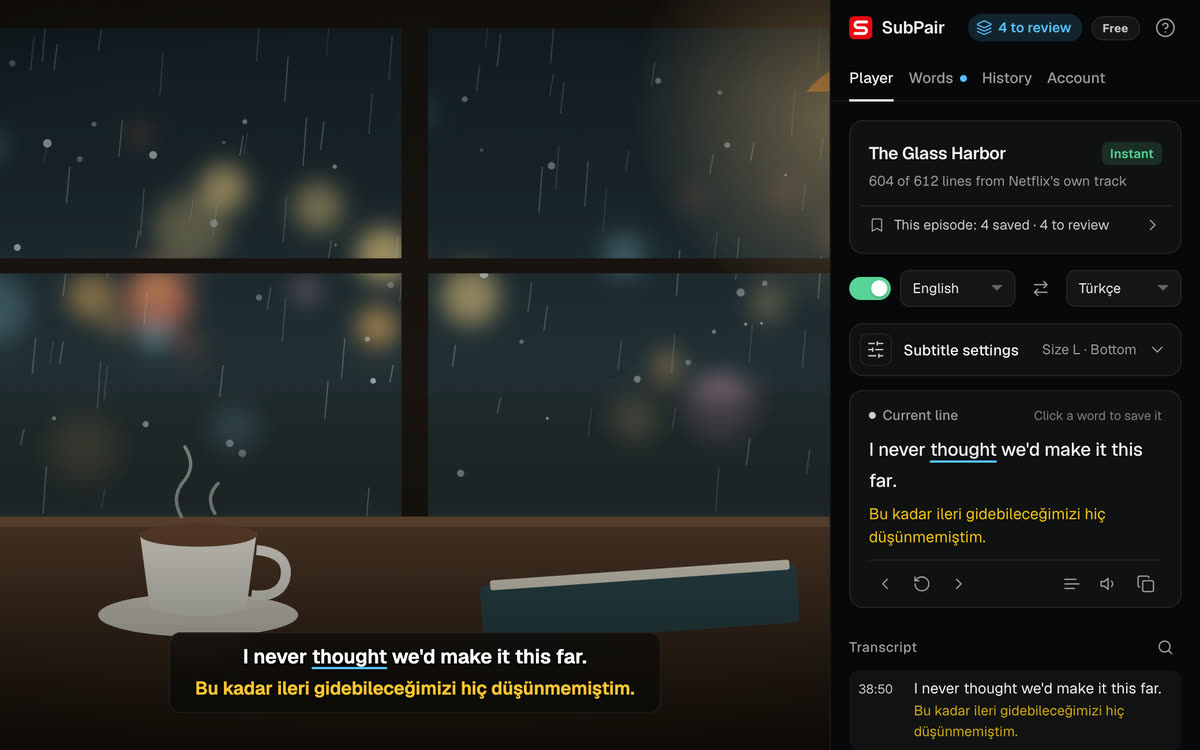
Set it up in five steps
- Install SubPair in desktop Google Chrome (Windows, macOS, Linux or ChromeOS).
- Open a title on the Netflix website and press play.
- Click the SubPair icon in the Chrome toolbar to open the side panel.
- Choose the subtitle language for the top line (usually the language you are learning) and the language for the second line.
- Keep watching. Both lines appear, and the side panel shows whether the second line comes from Netflix’s own track (Instant) or from auto-translation (Auto).
Make it fit the way you watch
- Change the size and position of the lines, hide the original line, or put it above or below the translation.
- Blur the translation until you have tried the line yourself (Alt+B).
- Pause automatically at the end of each line (Alt+P).
- Go to the previous line, replay it or skip ahead with A S D.
- Click any word for its meaning, or drag across several words to save a whole phrase.
What’s free and what’s Pro
- Free
- Unlimited dual subtitles from Netflix’s own tracks, 100 auto-translated lines a day, the click-word dictionary (word look-ups don’t count, up to 300 a day), unlimited saving, review, transcript, CSV and SRT export.
- Pro — $4.99/month or $39/year
- Unlimited auto-translation, per-line appearance and Anki export with scene context.
Good to know
- You need your own Netflix subscription. SubPair adds subtitles and learning tools; it doesn’t provide or unlock any video.
- The second line is instant only when the title has a subtitle track in that language. Otherwise auto-translation is used, and the side panel says so.
- If a title can’t be subtitled, the side panel tells you why and lists the languages that are available.
Questions about dual subtitles on Netflix
No. The Netflix player shows one subtitle language at a time. In desktop Chrome, an extension such as SubPair can draw a second line on top of the player.
Yes. Dual subtitles from Netflix's own subtitle tracks are unlimited on the free plan, and no account is needed. Auto-translation for missing lines is free up to 100 lines a day; Pro ($4.99/month or $39/year) removes that limit.
No. Chrome extensions run only in desktop Chrome on Windows, macOS, Linux and ChromeOS, so SubPair works on the Netflix website in that browser.
Any two of SubPair's 32 subtitle languages. The second line is instant when the title has a Netflix subtitle track in that language; otherwise auto-translation fills it.
No. SubPair draws both lines itself and leaves your Netflix settings as they are. Turn it off and the player looks exactly as before.